Almost every lost top-up comes down to one of three things: the wrong network, an expired quote, or sending slightly less than the amount shown. All three are avoidable in under a minute of checking.
Crypto transactions are irreversible. There is no chargeback and no support ticket that reverses a send. Check the network and the address before you confirm — not after.
The four options, and what each one costs you
A ZERO ID top-up can be paid in USDT, Bitcoin, Ethereum or USDC. They are not equivalent choices — they differ in fee, speed and how much the amount can move while you are paying.
| Coin | Network | Typical fee | Price moves? |
|---|---|---|---|
| USDT | TRC20 (Tron) | Low | No — dollar-pegged |
| USDC | ERC20 (Ethereum) | Higher — Ethereum gas | No — dollar-pegged |
| ETH | ERC20 (Ethereum) | Higher — Ethereum gas | Yes |
| BTC | Bitcoin | Varies with congestion | Yes |
If you have no strong preference, use USDT on TRC20. It is dollar-pegged, so the amount you owe does not drift while you are confirming, and the network fee is small. That combination is why it is the default on the payment page.
The expensive mistake: wrong network
This is the one worth understanding properly, because it is unrecoverable.
USDT exists on several blockchains. The same ticker, the same name, entirely different networks. The ZERO ID receiving address for USDT is a Tron (TRC20) address — it begins with T. If your wallet is set to send USDT on Ethereum or BNB Chain instead, it will ask for an address starting with 0x.
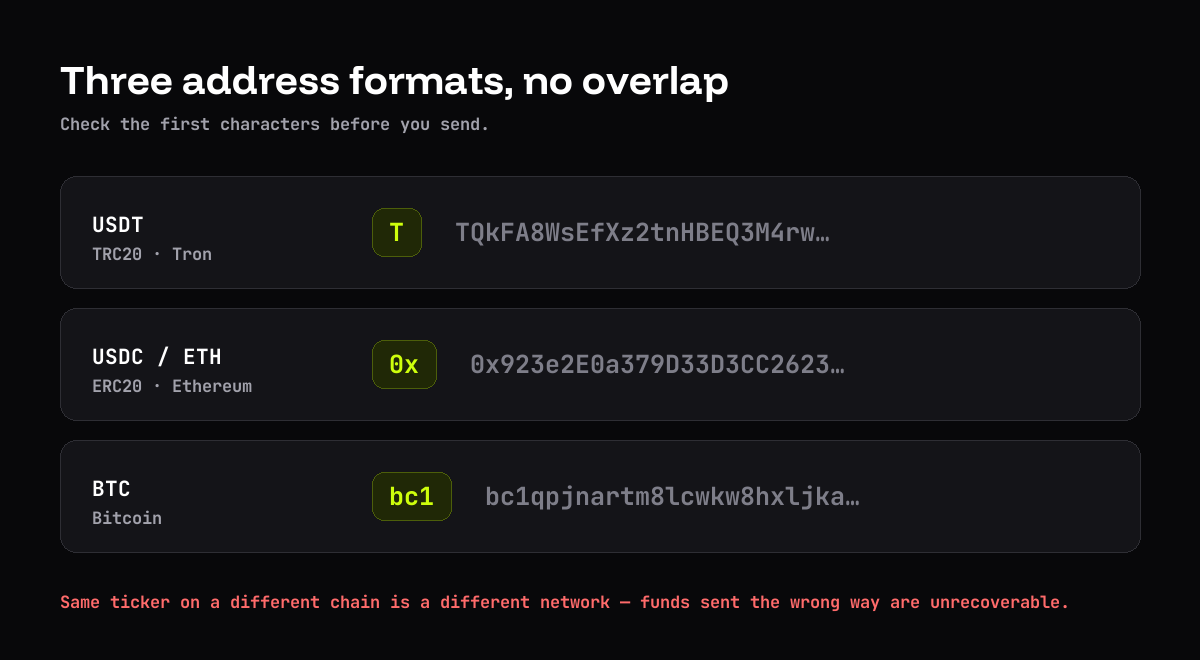
Before confirming, read the network selector in your own wallet — not just the address. Matching addresses is not enough if the network dropdown is wrong.
Topping up, step by step
- Pick your coin first, on the payment screen, before entering the amount. Switching afterwards regenerates the address.
- Enter the top-up amount. The first load has a minimum — $100 on Virtual and Core, $300 on Prime, $1,000 on Black.
- Generate the payment. You will get an address, a QR code, the exact amount in your chosen coin, and a countdown.
- Copy the address with the copy button, not by hand.
- Check the network in your wallet matches the one on screen.
- Send the exact amount shown, then confirm on the page.
Why “exact amount” means exact
Under-payments cannot be credited automatically. The two usual causes:
- Fee deducted from the send. Some wallets subtract the network fee from the amount you typed rather than adding it on top.
- Rounding. Trimming
0.002500 BTCto0.0025is fine; trimming it to0.002is a 20% shortfall.
Sending slightly more is harmless. Sending slightly less creates a manual problem.
The countdown, and what to do when it runs out
The payment screen holds the quote for a fixed window. For USDT and USDC that is mostly a formality. For BTC and ETH it matters: the amount was calculated at a rate captured when you generated the payment.
If the timer expires before you send, go back and generate a fresh payment. Do not send against an expired quote and hope.
A note on privacy when funding
The card itself carries no identity, but the top-up is a public blockchain record. If you send from an exchange account registered in your name, that record links your identity to the receiving address permanently.
If funding privacy matters to you, that is a wallet decision made before you reach the payment page. The privacy habits guide covers the wider picture.
Thirty-second checklist
- Coin on the page matches coin in the wallet.
- Network on the page matches the network dropdown in the wallet.
- Address pasted, never typed — and the first and last four characters match.
- Amount is the exact figure shown, fee added on top.
- Countdown still running.